
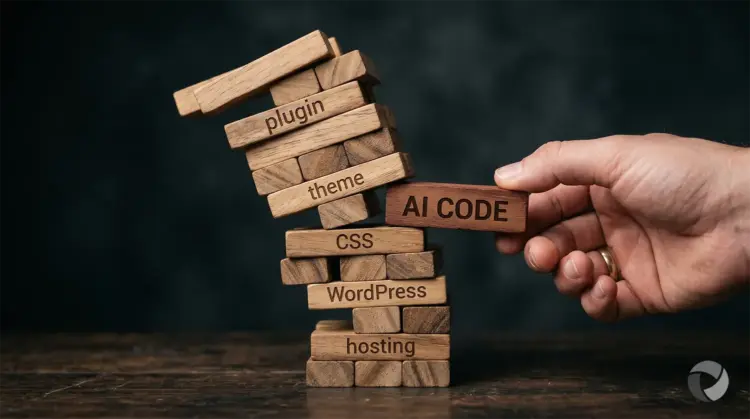
 AI tools are everywhere right now, and business owners are experimenting with them in ways that would have seemed remarkable just a couple of years ago. Writing product descriptions, drafting emails, generating images, and increasingly, asking AI to help with website changes. It makes sense. These tools are fast, confident, and available at any hour. If you need a new page on your website or want to add a specific feature, asking ChatGPT feels like a reasonable shortcut.
The problem is that websites are more interconnected than they look from the outside. A change that seems small and self-contained can ripple into parts of your site you never intended to touch. We have already seen it happen more than once with clients who have come to us with AI-generated code or AI-built tools, and the results have ranged from a broken layout to a website that went completely offline.
This article is not an argument against using AI. It is a practical look at where things go wrong, and what you should do to protect your website when you are working with AI-generated code or suggestions.
Why People Try It
There is nothing wrong wanting to use AI on your website. These tools are really impressive, and they sound very authoritative when they explain what they are doing. For a business owner who just wants a new page added or a specific function built, raising a support ticket and waiting feels slower and more expensive than simply asking an AI and forwarding the result.
AI tools are also improving quickly. They can produce code that looks correct, is formatted properly, and comes with a confident explanation of how it works. The issue is not that the code is always wrong. The issue is that AI has no visibility into your specific website environment, and that gap between what the code does in isolation and what it does inside your particular setup is where things break.
What Can Actually Go Wrong
The Page That Didn’t Belong
One of our clients used an AI tool to build a new page for their WordPress website, but when we inserted the code, it clashed with the site’s existing stylesheet. Because the stylesheet controls the website’s entire visual identity, the new layout broke instantly. Instead of a seamless addition, the result wasn’t just a design mismatch; the page was broken and failed to function as intended..
Because the client sent the code to us before it went live, we caught the problem and were able to resolve it before anyone outside the business saw it. That outcome was good, but it was not guaranteed. If the code had gone straight onto the site without a review, the client’s visitors would have landed on a page that looked broken and out of place, which is not a great impression for any business. It only worked out because there was a professional review step between the AI output and the live website.
The Plugin That Took a Site Offline
A second client needed a specific piece of functionality on their WordPress website that did not exist as an off-the-shelf solution. They asked AI to build a custom plugin for it. Claude produced one. The client installed it. The website went offline with a critical error.
A custom plugin built by an AI has no awareness of the theme you are running, the other plugins already installed, or the version of WordPress your site is on. Any of those factors can create a conflict, and with WordPress running so many components alongside each other, the chances of one surfacing are higher than most people expect. In this case, the conflict was serious enough to take the entire site down, not just the new feature. The client then had no way to access the admin area to remove it and their website was offline while the problem was diagnosed and resolved.
The Risks of AI Code in Any CMS
Most of our clients have websites built on a WordPress platform. It is the world’s most widely used content management system (CMS). A WordPress website is not a single piece of software. It is a combination of WordPress core, a theme, and many plugins, all running together and interacting with each other in ways that are not visible from the front end of the site.
When AI generates code or builds a plugin for WordPress, it is working from general knowledge of how WordPress functions. It has no idea what theme you are using, which version of that theme, which plugins are active, whether any of those plugins have known conflicts with certain code patterns, or how your hosting environment is configured. A piece of code that works perfectly on one WordPress installation can cause a critical error on another simply because of what else is installed alongside it.
There is also a security dimension that is easy to overlook. AI-generated code has not been reviewed, tested, or vetted by anyone other than the person who asked for it. It can contain vulnerabilities that an experienced developer would catch immediately but that are invisible to a business owner reviewing it without a technical background. Installing untested code on a WordPress site can open the door to the same kinds of exploits that attackers actively look for, particularly if the code interacts with your database or handles any form of user input.
This is not a flaw in AI. It is a fundamental limitation. You cannot troubleshoot a system you cannot see.
The same risk applies to any platform where code or configuration changes can be made. Shopify stores, Wix websites, Squarespace sites, and custom-built platforms all have their own rules about how third-party code interacts with the existing environment.
Shopify, for example, uses its own templating language called Liquid. AI tools can generate Liquid code, but without knowing the specific structure of your theme, that code can produce unexpected results or break existing functionality. On Wix and Squarespace, injecting custom code through embed blocks carries similar risks if the code interacts with elements the platform was not expecting it to touch.
The platform does not matter as much as the principle: AI-generated code dropped into a live website, without a review by someone who understands that environment, is a risk regardless of what system your site is built on.
Should You Never Use AI for Your Website?
No, that is not the conclusion here. AI tools have genuine value in a website context. They can help you draft content, think through site structure, write page copy, and brainstorm ideas for features you might want to add. Used in that way, they can save real time and produce useful results.
The danger is specifically in code and configuration changes applied to a live website without a professional review. AI can produce code that looks correct and comes with a confident explanation, but it cannot account for your specific environment. That is the gap where websites break.
If an AI tool suggests a code change, builds something for you, or recommends installing a plugin you have not heard of, the right move is to pass it to your web professional before anything goes near your live site. That is not a knock on the AI. It is just how you protect something your business depends on.
What To Do Instead
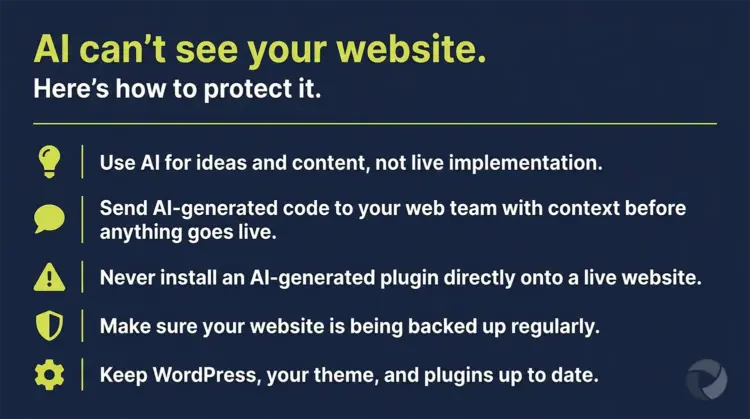 If you are working with AI to plan changes or additions to your website, here is a straightforward approach that keeps things safe.
Use AI for ideas and content, not live implementation. AI is well suited to helping you think through what you want, draft the copy for a new page, or describe a feature you are looking for. That output can then go to your web team to implement properly.
If an AI tool produces code, treat it as a starting point, not a finished product. Send it to your web designer with a note explaining what it is meant to do, which AI tool produced it, and where on the site you want it to go. That context helps your web team assess it quickly and accurately rather than having to work backwards from an unfamiliar block of code.
Never install an AI-generated plugin or script directly onto a live website unless you know how to recover if it crashes.
Make sure your website is being backed up regularly. This applies regardless of AI, but it becomes especially important when changes are being made. A recent backup is what makes a fast recovery possible when something goes wrong. If you are not sure whether your site is being backed up, that is worth finding out before anything else changes.
Keep your WordPress installation, theme, and plugins up to date. An outdated environment is harder to troubleshoot and more likely to conflict with new code. Regular maintenance reduces the surface area for problems.
⚡TL;DR: AI Code and Your Website
AI tools can help with your website, but code changes need a professional review before they go anywhere near your live site.
- AI has no visibility into your website environment. It does not know your theme, your plugins, or your hosting setup, and that is where conflicts happen.
- There is a security risk too. AI-generated code has not been vetted by anyone and can contain vulnerabilities that are easy to miss without a technical review.
- We have seen it go wrong. A client’s AI-generated page code broke the site layout due to a stylesheet conflict. Another client’s AI-built plugin took their entire WordPress site offline.
- Content Management Systems are particularly vulnerable because they run multiple components together, but any platform can be affected.
- Make sure your site is backed up. A recent backup is what makes recovery possible. If you are not sure, find out before anything changes.
- AI is not the enemy. Use it for content, ideas, and planning. Just make sure a professional reviews any code before it touches your live site.
- When in doubt, send it to your web team first. That one step is what separates a good outcome from an expensive one.
The bottom line: AI-generated code is only as safe as the review process behind it. One conversation with your web team before you make a change is a lot cheaper than fixing the aftermath.
How Energise Web Can Help
We have been building and maintaining websites for NZ small businesses since 1999, and we are increasingly being asked to review, repair, or recover sites where AI-generated code has caused problems. If your website has had an unexpected issue after a recent change, or if you have AI-generated code you are not sure about, we are happy to take a look.
Whether you need a one-off review, ongoing WordPress maintenance, or a full website rebuild after something has gone wrong, get in touch with us and we will give you an honest assessment of where things stand.